How to make a DVD of your videos uploaded from the internet, or your camcorder?
1- First of all you have to be sure that you have your video on your computer, it can be in any format (.avi, .divx, .mpg, .mkv, .wmv, .xvid,etc..)
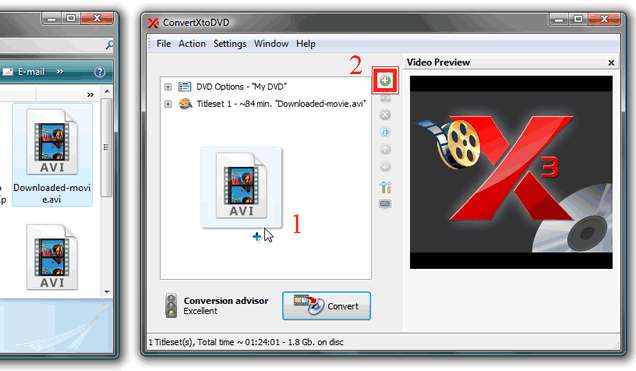
2- Add your video file to ConvertXtoDVD that is located in your computer or just drag-n-drop it.
3- If you are a beginner, or you don't want to take advantage of ConvertXtoDVD options, just click Convert! Wait the conversion process, and you are done.
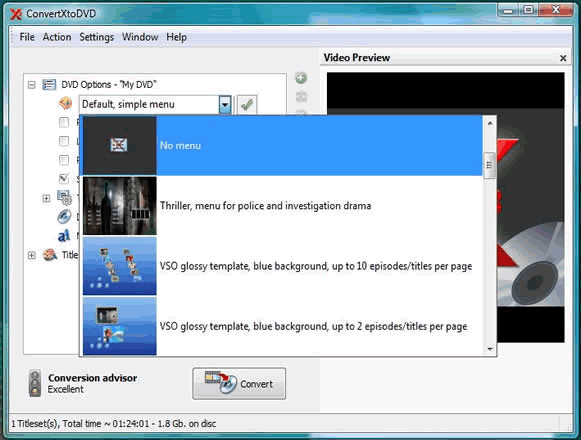
4- You can also customize your project, ConvertXtoDVD offers you many options to do; you can choose a menu(template when your DVDs starts running), rename your DVD.

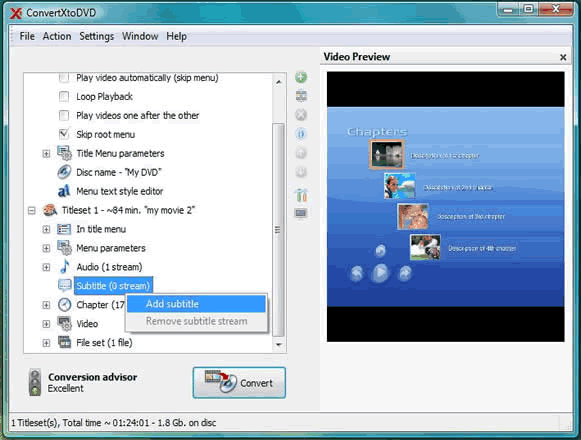
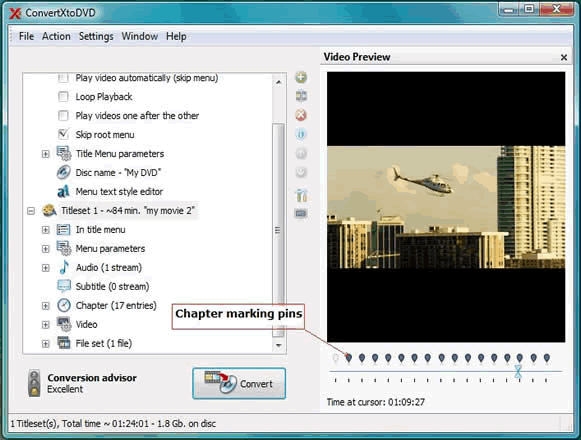
5- More options are also available; you can add your own audio for the menu auto-run, adding subtitles, and adding chapters to your own DVD video.
6- Are u ready to convert? Just click the Convert button, and wait a while.
After the conversion process is complete ConvertXtoDVD will demand you to insert your DVD blank and the burning process starts automatically.
7- Congratulations, enjoy watching your own DVD video on any DVD player!
If you want to start converting your videos, go to the Download page to learn more.

Buy ConvertXtoDVD Now - Discount 30 % on purchase
Do you want to read the full manual of ConvertXtoDVD? Please type your email.
|
|